If you’ve been Googling “headless CMS vs WordPress” lately, you’re not alone. It’s one of the most common questions I get from business owners and marketers in 2026.
Everyone seems to have an opinion. Some developers will tell you headless is the future and WordPress is dying. Others will say headless is overkill and a waste of money. The truth? It’s somewhere in the middle, and it really depends on your situation.
I’ve been building websites for 7+ years, working with 120+ clients across the US, UK, Europe, and more. In this article, I’ll give you an honest, practical comparison of headless CMS vs WordPress so you can make a smart decision for your business without the tech jargon.
Let’s get into it.
What Is Traditional WordPress (And How It Works)
WordPress is what most people picture when they think “website.” It’s been around since 2003, and today it powers over 42% of all websites on the internet. That number alone tells you a lot.
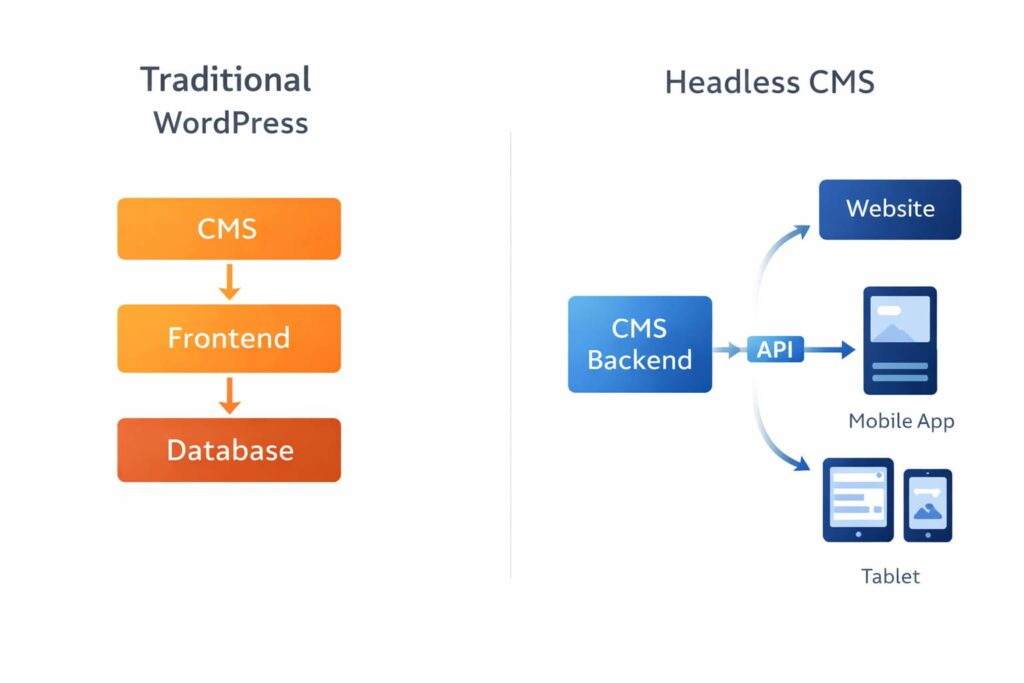
In the traditional setup, WordPress handles everything in one place:
- Your content lives in a database
- Your design comes from a PHP theme (or a builder like Elementor)
- The server puts it all together and sends a complete HTML page to the visitor
It’s what’s called a monolithic or coupled CMS. The back end and front end are connected. One system, one admin panel, everything in one place.
This is the approach I use for my clients at Reshetar.Dev, and there’s a very good reason for that, which I’ll explain a bit later.
What Is a Headless CMS?
A headless CMS removes the “head,” which is the front-end part of the website, from the equation. The CMS only stores and manages your content. It doesn’t care how that content looks or where it gets displayed.
Instead, content is delivered via an API to a separate front end, usually built with modern JavaScript frameworks like Next.js, Gatsby, or Nuxt.
Popular headless CMS platforms include:
- Contentful
- Sanity
- Strapi
- Prismic
- And yes, WordPress can work headlessly too (more on that below)
Think of it this way. A traditional CMS is like an all-in-one restaurant, kitchen and dining room in the same building. A headless CMS is just the kitchen. It prepares the food, but you decide where and how it gets served.
Wait, Can WordPress Be Headless Too?
Yes. This is where it gets a little confusing, but it’s important.
WordPress has a built-in REST API and supports GraphQL via a plugin called WPGraphQL. This means you can use WordPress purely as the content back end while building your front end with a JavaScript framework like Next.js.
So you get three options in 2026:
- Traditional WordPress — Everything in one system, PHP themes or Elementor
- Headless WordPress — WordPress back end + custom JS front end
- Pure Headless CMS — A dedicated headless platform (Contentful, Sanity, etc.) + JS front end
For most small and medium businesses, option 1 is the right answer. Options 2 and 3 have their place, but that place is rarely a standard business website. Let me explain why.
Headless CMS vs WordPress: The Real Differences
Speed and Performance
This is where headless gets a lot of attention.
Headless sites, especially when using static site generation (SSG), can be incredibly fast. Pages are pre-built as static HTML files and served instantly from a CDN. No PHP, no database queries on every visit.
Traditional WordPress can also be very fast, but it takes more work. You need good hosting, caching (WP Rocket, LiteSpeed Cache), image optimization, and a clean codebase. When done right, the speed difference between a well-optimized WordPress site and a headless one is minimal for most users.
The honest truth: A poorly built headless site will be slower than a well-optimized WordPress site. Architecture alone doesn’t guarantee speed. The developer’s skill does.
SEO
Traditional WordPress wins here, especially for teams without dedicated developers.
Plugins like RankMath and Yoast give you complete SEO control out of the box: meta tags, schema, sitemaps, redirects, breadcrumbs, all without writing a single line of code.
With headless, you’re responsible for building all of that SEO infrastructure yourself, or finding and integrating the right tools. It’s doable, but it adds time and cost.
Also, the old fear that Google can’t index JavaScript-rendered headless sites? Mostly solved now if you use SSR (server-side rendering) or SSG with Next.js. But you still need to know what you’re doing.
Cost to Build
This is the biggest factor for most businesses.
| Traditional WordPress | Headless CMS | |
|---|---|---|
| Initial build cost | Lower | Much higher |
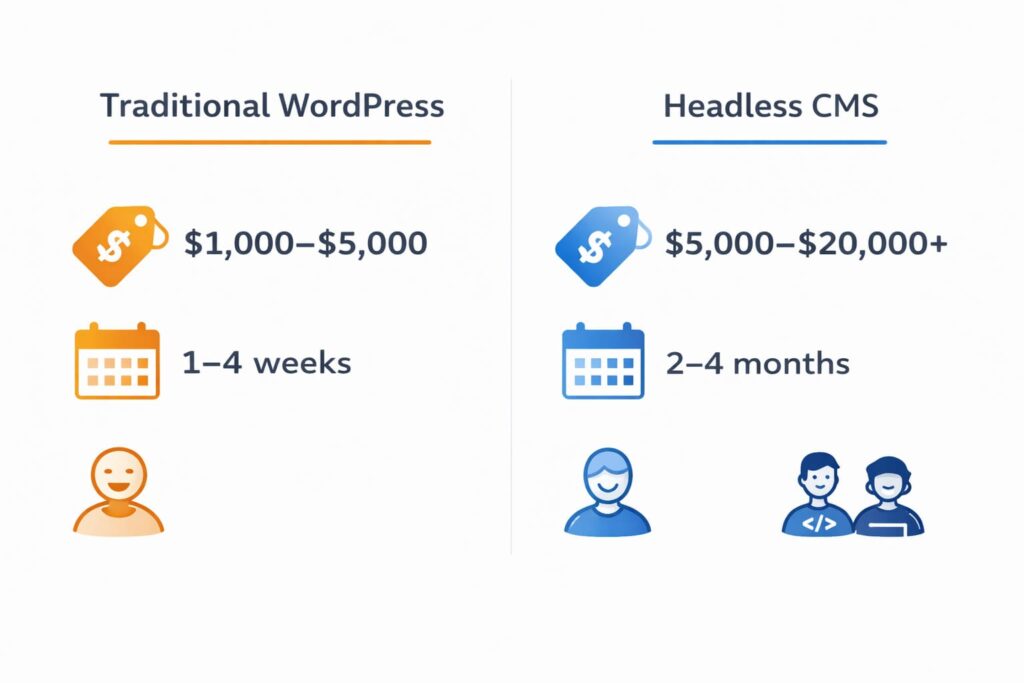
| Timeline | 1–4 weeks | 2–4 months |
| Who can build it | Most WordPress developers | Senior full-stack devs |
| Ongoing dev cost | Low | High |
| Client can edit | Yes, easily | Depends on setup |
A traditional WordPress site with Elementor can be launched in 14 days (which is exactly how I work). A headless project? You’re looking at months and a much bigger budget.
Ease of Use for Non-Developers
With WordPress and Elementor, my clients can log in after launch and update their own content, change text, add new pages, swap images, no developer needed.
With headless CMS, the back-end editor can be clean and intuitive (especially Sanity or Contentful). But making design changes or adding new sections usually requires a developer. Always.
For a small business owner who wants independence? WordPress wins this by a mile.
Security
Headless CMS has a genuine advantage here.
Because the front end is completely separate from the CMS, attackers can’t access the back end directly through the website. There’s no PHP exposed to the public. It’s a smaller attack surface.
Traditional WordPress, especially with lots of plugins, can have vulnerabilities. That said, a properly maintained WordPress site with good hosting and security practices is not inherently insecure. I’ve never had a client site hacked when they followed proper security protocols.
Flexibility and Omnichannel
This is where headless genuinely shines.
If you need to deliver the same content to a website, a mobile app, a digital kiosk, a smartwatch, and a voice assistant, headless is built for that. Write once, publish everywhere via API.
For 99% of small and medium businesses? You have a website. That’s it. You don’t need omnichannel content infrastructure. You need a clean, fast, well-converting website.
Scalability
Headless CMS handles massive scale better. Think 50,000+ articles, millions of monthly visitors, or a global media company. That’s the right context for headless architecture.
For an SMB with a 20-page site or even a WooCommerce store with 500 products? WordPress scales just fine with the right hosting.
Quick Pros and Cons Summary
Traditional WordPress
Pros:
- Fast to launch (14 days or less)
- Much lower cost
- Great SEO tools out of the box (RankMath, Yoast)
- Clients can edit content themselves
- Huge community and plugin ecosystem
- Easy to find developers
- WooCommerce for e-commerce
Cons:
- Can get slow if built carelessly
- More plugin = more potential security issues
- Less flexible for complex multi-channel setups
- PHP can feel dated compared to modern JS stacks
Headless CMS
Pros:
- Blazing fast when done right (static generation + CDN)
- Great security (smaller attack surface)
- Perfect for omnichannel (website + app + more)
- Modern developer experience
- Scales well for high-traffic, complex projects
Cons:
- Expensive to build and maintain
- Needs experienced developers
- SEO requires custom setup
- Clients often can’t make design changes alone
- Total overkill for most SMB websites
So Which One Should You Choose?
Here’s a simple way to decide:
Go with Traditional WordPress if:
- You’re a small or medium business with a website, landing pages, or WooCommerce store
- You want to be able to edit your site yourself after launch
- You need to launch fast and on a reasonable budget
- SEO is a priority and you don’t want a custom setup
- You want a large pool of developers to choose from in the future
Go with Headless CMS if:
- You’re building a product that needs to deliver content across multiple platforms (web + app + more)
- You have a dedicated development team or budget for one
- You need extreme performance at very high traffic scale
- Your project is more of a software platform than a marketing website
Go with Headless WordPress if:
- You love the WordPress content interface but need a modern JS front end
- Your team has both WordPress and JavaScript expertise
- You want flexibility without switching your CMS completely
My Honest Take After 120+ Projects
I’ve seen the headless hype go up and down. And yes, I’ve built headless projects too.
But when a small business owner comes to me and says “I need a website that brings in leads, looks professional, and I can update myself,” the answer is always WordPress. Not because I don’t know headless. It’s because it genuinely solves their problem better, faster, and at a fraction of the cost.
Headless is a powerful tool. But using a power tool where a regular one works just fine doesn’t make you smarter. It just makes the project more expensive.
Build what solves the problem. Not what sounds impressive at a tech meetup.
Frequently Asked Questions
Is headless CMS better than WordPress?
Not necessarily. Headless CMS is better for complex, multi-channel projects that need blazing-fast performance and omnichannel content delivery. WordPress is better for most small and medium business websites because it’s faster to launch, easier to maintain, and has better out-of-the-box SEO tools.
Can WordPress be used as a headless CMS?
Yes. WordPress has a built-in REST API and supports GraphQL via the WPGraphQL plugin. You can use WordPress as the content back end while building a custom front end with Next.js or another JavaScript framework. This is called Headless WordPress.
Is headless CMS harder to SEO?
Yes, it requires more setup. With traditional WordPress, plugins like RankMath handle meta tags, schema, and sitemaps automatically. With headless, you need to build or integrate that infrastructure yourself. When done correctly using SSR or SSG, headless sites can rank just as well as WordPress.
How much does a headless CMS website cost compared to WordPress?
A traditional WordPress website typically costs between $1,000 and $5,000 depending on complexity. A headless CMS project usually starts at $5,000 to $20,000 or more due to the additional development complexity. Ongoing maintenance is also significantly higher for headless setups.
Which is faster, headless CMS or WordPress?
A headless site using static site generation can be faster because pages are pre-built as static HTML. However, a well-optimized WordPress site with good hosting, caching, and image optimization is very close in speed for most use cases. Architecture alone doesn’t determine speed. The quality of implementation does.
Have questions about which setup makes sense for your business? Drop me a message and I’ll give you a straight answer.
